
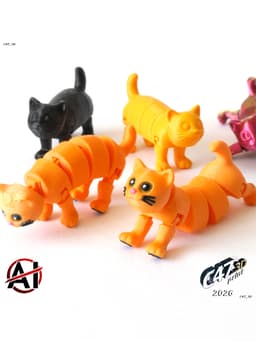


Flexi Transforming Cat
A model of a Cat that transforms from flexi state to solid one
To lock the legs set them streight down and push up. You will hear a click
The force and tolerances on the model are set like for kids - but it will depend on the filament used and slicer options
Model can be printed in one color or in 2-5 colors on multicolor printer 5 colors can be used in 4 color printer (filament for nose changed to filament for eyes sparkle after a pause)
If you want to sell prints of this model let me know, I will prepare a commercial licensed version You can also buy a Commercial Membership for all my models on Thangs
PRINTING TIPS
0.12-0.16mm recommended but works with 0.2mm too 5-10% infill 2-3 walls
Let the model cool off before assembling
There is bult-in brim around head connector - remove it after a print
The highier layer height the smaller is the force needed to connect parts - in some cases model may not stay in solid state if printed with too high layer height Some filaments works different than others You can use a positive XY compensation (like +0.01-0.05mm) to make connectors stronger
After a print you will need to break small connections between parts Just move parts a little and it should be all right
Head is not connected to the body after a print - you will need to push it in all the way Part connected to the body shouldn't pop out when transforming model to flexi state but for safety reasons you can glue it in to not loose the head
Part of connectors will be printed 'half-in air' There is a 0.2mm gap between connectors and base model on Z axis - this works like a self support
It is not recommended to resize model up - apart of connectors looking little worse there should be no problems with the print itself but you may need too much force to transform from solid to flexi. You are free to test it tho
MULTICOLOR
Print one single color (with body color) model first before going to print MULTICOLOR See if everything will work fine
Multicolor files are with a 'frame' - it helps in setting models in the right place, it will not be printed Ignore model 'errors'
Select base model and all of MULTI files and drop them to the slicer Click 'yes' when asked if you want to add it as one model - it will merge all the models to one If there will be no such notification merge them by yourself (select all, right click and merge) Then choose a color for each model
Eyes-Inner - dark / black Eyes-Outer - light yellow / green etc. Eyes-Sparkle - white Nose, Smile - red / pink Paddings - dark brown / black Whiskers - black
If models are merged you can then duplicate them to fill the bed plate
Flexi Transforming Cat

Piggy Bank

Flexi Reindeer Doodle

Springy Piggy

Low-Poly Bunny Phone Holder

Halloween Capybara

Tetris Puzzle Cube

Springy Bunny

Flexi Capybara Skeleton Snake

One-coin Piggy Bank

Reindeer Phone Stand

SpringBee

Crappy Piggy Bank V2

Fox Phone Holder

Skull Vase V2

Flexi Transforming Dog

Flexi Snake

Capybara Phone Holder

Springy Cat

Piggy Set
