bigfluffy m
deLira314 followers
Follow
deLira
deLira
|
Image 1 of 9
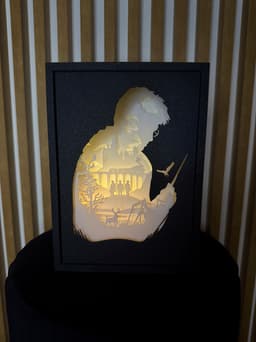
Harry Potter Shadow Box Lamp 3d model
deLira
deLira
|
Image 1 of 9
Harry Potter Shadow Box Lamp 3d model

Harry Potter Shadow Box Lamp

Subscribe for access starting at $20 USD
Get access to this model and 26+ more
This model is restricted by licensing terms. 

Step into the wizarding world with this 3D shadow box lamp, inspired by Harry Potter.

🌟 Perfect for:

  • Harry Potter fans & collectors
  • Magical bedroom or gaming room decor
  • Unique gifts for wizards and witches of all ages

🖨️ Print Requirements: ✅ Layers 4, 6, and the Patronus must be printed with a 0.2mm nozzle for fine detail (you can also print this way layer 7 with castle if you want the best possible print with more windows) ✅ Patronus must be glued underneath layer 2 for proper alignment and effect ✅ Can be customized with different LED colors, I used light blue LED strip from Temu Multi-layer shadow box lamp designed for LED backlighting. Layered construction creates depth and clear silhouette separation when illuminated.

Print & Build Notes: 🔧 Filament: PLA  • Black PLA – OPTIONAL for outer box and first layer  • White PLA with good transparency – light-diffusing layers

🔧 Print orientation:  • Plates are uploaded upside down  • Printing on a Textured PEI Plate in this orientation improves visible surface quality

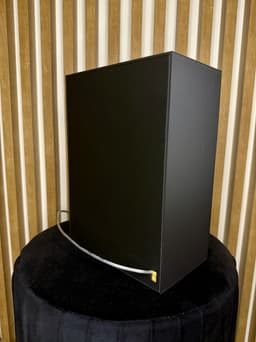
Lighting: 🔧 Warm white LED strip recommended 🔧 Attach the LED strip horizontally to the lower half of the inner box back wall 🔧 Ensure even alignment for uniform light diffusion

Assembly: 🔧 Insert the layers (Layer 1, Layer 2, Layer 3, etc.) into the inner box in the correct order 🔧 Place the top holder onto the inner box from above 🔧 Slide the outer box onto the assembly from the front

Community Makes (1)
Printed all parts with 0.4 mm nozzle on a Creality K1 Max with HyperPLA filament. I had to sand the channels the scenes slide in a little bit and I also scaled the scenes to be 4mm thick instead of 6. It took me a few days to piece everything together (partially because of failed prints due to bad filament) but in the end it was 100% worth the effort. It looks absolutely gorgeous.


Community Makes (1)
Printed all parts with 0.4 mm nozzle on a Creality K1 Max with HyperPLA filament. I had to sand the channels the scenes slide in a little bit and I also scaled the scenes to be 4mm thick instead of 6. It took me a few days to piece everything together (partially because of failed prints due to bad filament) but in the end it was 100% worth the effort. It looks absolutely gorgeous.

Discussions
Arsel T
arseltanriverdi
Printed all parts with 0.4 mm nozzle on a Creality K1 Max with HyperPLA filament. I had to sand the channels the scenes slide in a little bit and I also scaled the scenes to be 4mm thick instead of 6. It took me a few days to piece everything together (partially because of failed prints due to bad filament) but in the end it was 100% worth the effort. It looks absolutely gorgeous.
Printed all parts with 0.4 mm nozzle on a Creality K1 Max with HyperPLA filament. I had to sand the channels the scenes slide in a little bit and I also scaled the scenes to be 4mm thick instead of 6. It took me a few days to piece everything together (partially because of failed prints due to bad filament) but in the end it was 100% worth the effort. It looks absolutely gorgeous. 3d model
 3d model
PrinterCreality K1 Max
MaterialPLA
Layer height0.2 mm
Infill density15 %
SupportsNone
bigfluffy m
deLira

Amazing work!

Heather D
sweet.verona

The patronus doesn't show up on layer 2 in the files.

bigfluffy m
deLira

because it's on the plate 9 and in description there's a note to glue it

Harry Potter Shadow Box Lamp

254 downloads · 1 year ago in  and 
bigfluffy m
deLira314 followers
Follow
Subscribe for access starting at $20 USD
Get access to this model and 26+ more
This model is restricted by licensing terms.