
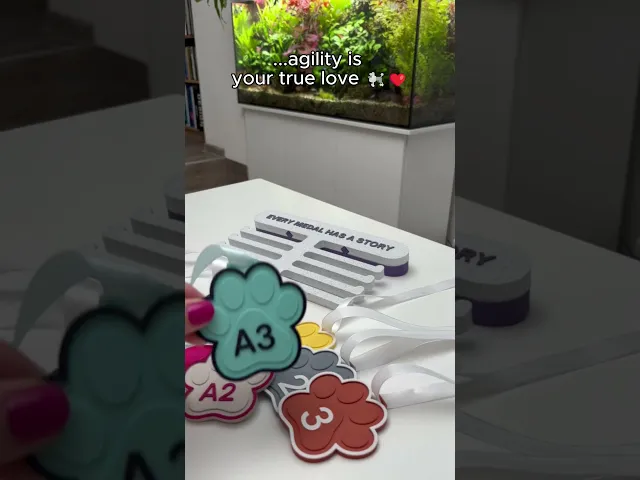


AGILITY MEDAL DISPLAY SET
Every medal tells a story. Give yours a place to be seen.
Agility Medal Display Set is designed for handlers and dogs who have worked hard for every achievement. Instead of keeping medals hidden away in drawers or boxes, this display system turns them into a visible reminder of training, teamwork, progress, and unforgettable moments in the agility ring.
The wall-mounted display stand creates a practical gap between the wall and the display, making it easy to add new medals as your collection grows. Whether you're celebrating your first competition, reaching a new agility level, or collecting podium finishes, this system helps showcase your journey with pride.
The included paw-shaped medals can be used as decorative achievement markers, milestone awards, training goals, or personalized keepsakes. Choose from podium placements, agility levels, or create your own custom versions directly in your slicer.
Perfect for:
- Agility competitors
- Dog sports enthusiasts
- Training achievements
- Competition memories
- Dog clubs and teams
- Personalized awards
- Dog lover gifts
STAND: Available in four versions:
- Three versions with predefined text
- One blank version for custom text
The stand consists of two parts:
- Wall-mounted base
- Sliding front display section
The design creates a convenient gap between the wall and the display, allowing medals to be added and removed easily.
MEDALS Included Medal Types:
- Podium Series: 1st Place, 2nd Place, 3rd Place + Blank version for custom text
- Agility Performance Levels: A0, A1, A2, A3
Features:
- Wall-mounted display system
- Easy medal access
- Modular two-part construction
- Paw-shaped achievement medals
- Customizable text options
- Designed for agility competitors
- Decorative and functional
- Ideal for growing medal collections
Dimensions:
- Stand: 240 × 138 × 50 mm
- Medals: 76 × 76 × 4.5 mm


AGILITY MEDAL DISPLAY SET

POOP BAG STATION

PAW TREAT KEYCHAIN

FLEXFETCH DISC

TREAT ROLLER

MEDIPAW BOX

DRYO NEST

PAWSTACK TREATS CONTAINERS

PAWROUTINE WALL CLOCK

POOP PAWSKETS

POOPLOOP

CLEANWALK PAW

WHISPER VASE

PAWZZLE DUO & PAWZZLE QUARTET

VERTICAL POUCH DISPENSER

VICTORY PAW TROPHY

DUO POT ORGANIZER

PAWSPIN TREAT ROLLER

SANDPAW ORGANIC TRAYS

ORBIT PUZZLE - ULTIMATE FLIP

Hello, I'm having some problems with the model. The top first layer isn't smooth; it has solid lines. I tried smoothing it, but that made it look even worse. I'm printing with a Bambulab P2S and using PLA matting, also from Bambu, and I've never had these problems before. What can I do?
Hi!
Thanks for reaching out — happy to help! This is actually a slicer settings issue rather than the model itself, so it should be a quick fix. Try the following in Bambu Studio:
These changes should give you a clean, smooth top surface. Let us know how it goes!
Thanks! But I did all settings got no improvement take a Look at my last picture. Do you have any other ideas? 🙈