
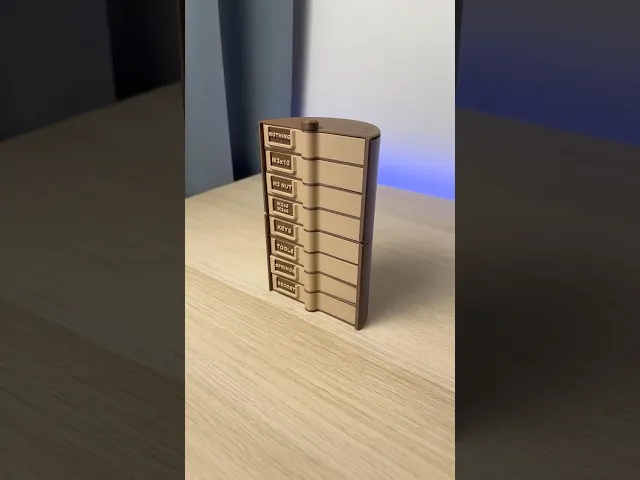


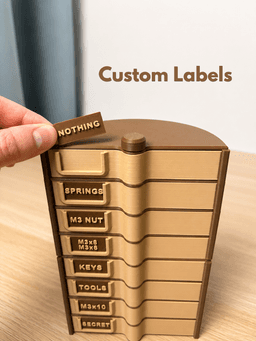
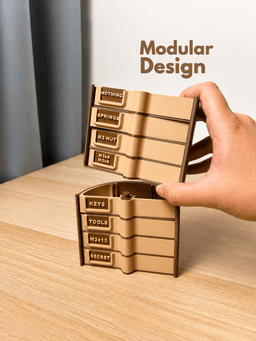

Rotating Organizer | Modular Storage Tower | Custom Labels
1 downloads · 2 hours ago · Keep your small parts organized with this modular rotating storage organizer. Customize the drawers,
This model is restricted by licensing terms.
View license.
Keep your small parts organized with this modular rotating storage organizer. Customize the drawers, labels, and dividers to create the perfect storage solution for your workspace. ✨
- Modular Design – Stack multiple levels to create an organizer as tall as you need.
- Smooth Rotating Base – Easily access every drawer with a simple spin.
- 4 Drawers per Level – Each module includes four spacious drawers.
- Customizable Dividers – Add optional dividers to create compartments that fit your needs.
- 🏷️ Custom Labels - Print drawers with or without label holders and personalize every label with your own text directly in your slicer.
- 📏 Drawer Depth: 18 mm
- Organizer Diameter: 116 mm
- 🛠️ Perfect for screws, nuts, electronics, craft supplies, LEGO parts, sewing accessories, and other small items.
🔧 How to Build the Main Tier
- Start with 01_Base – this is always the foundation of your tower.
- Begin stacking: place 04_Box on the base, then add 03_Partition on top of it.
- Repeat this sequence (04_Box → 03_Partititon) until all 4 boxes are used.
- Insert 02_Pivot through the center and screw it into the base to lock the whole tier together 🔩.
- Place 08_Roof on the very top. Finish by attaching 06_Plug – screw it onto the Pivot to secure the entire organizer
🔧 How to Add a Second Tier
- Instead of 01_Base, print 05_Base_Modular for the next level!!
- Place 05_Base_Modular directly on top of your completed first tier.
- For each additional tier, print again:
- 4× 04_Box
- 3× 03_Partition
- 1× 02_Pivot
- Build it the same way as the main tier and close it with 08_Roof + 06_Plug on top.
Pre-sliced .3mf print profile optimized for Bambu Lab printers
Rotating Organizer | Modular Storage Tower | Custom Labels
1 download · 2 hours ago in and
This model is restricted by licensing terms.
View license.

Modular Under Desk Drawer | MagSafe Module | Push-Push Lock

Modular Under Desk Drawer | 4×2 Gridfinity | Push-Push Lock

Cactus Bottle Drying Rack | Kitchen Organizer

Pill Box | Push & Turn | Pokemon

Cylinder Tambour Box | Roll top Storage | Organizer
.png&w=3840&q=75)
Cable Organizer - One-Sided Winding

Origami Box | Desk Organizer | Business Card Holder

Pill Dispenser | Fridge Magnet | Pokemon

Food Dispenser | Storage Container | Iris Mechanism

Roll Up Storage Box | Square Organizer

Spice Rack Organizer | Pull-Out Holder | 5 Jars

Modular Drawer System | Push-Push Lock

Roll Up Storage Box | Triangle Organizer
.png&w=3840&q=75)
Universal Clip Organizer | Multi-Purpose Storage | Flexible Holders

Safe | Money Bank | Lock | Piggy Bank
.png&w=3840&q=75)
Key Holder | Rotating Sign | Key Hanger

Capsule Tambour Box | Roll top Storage | Organizer

Magnetic Bin | Printer Accessory | Purge Bin

Roll Up Storage box | Organizer
