
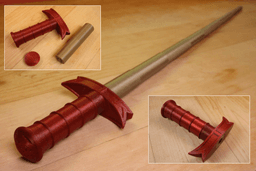

Collapsing Broadsword with Removable Blade
Collapsing Broadsword with Removable Blade
This collapsing sword is similar to the original version in appearance but its modified so a cap on the pommel can be screwed on and the blade can be printed separately and assembled.
Printing The hilt and pommel do not require supports. The blades can be printed concentrically as an assembly or individually in vase mode. If you plan to print concentrically, a single stl contains all the blades. If printing in vase mode, there is a stl for each blade. Note the vase mode stl’s are supposed to be solid so the slicer knows not to make an internal perimeter.
Vase Mode I prefer printing the blades in vase mode as the result is a much cleaner and easier print that can easily be scaled. If you print sequentially, it’s faster too. If printing at 100% scale, set the line width to .9mm. If you plan to print it smaller, scale the line width down by the same about. If printing in vase mode you can scale down to a minimum of 55% with a .4mm nozzle. For vase mode turn top and bottom layers on for the first blade, but turn it off for segments 2-5. You will notice that the vase mode files are solid, this is so your slicer knows not to try to build a inner perimeter.
Concentric When printing the blades concentrically use a .4mm nozzle and set the line width to .42 so the blades are two shell thick. If you would like to scale it down try printing the vase mode version instead. Before printing the blade assembly make sure perform the test print found here This print is sensitive to the layer seam and extruder calibration, it’s a good idea to make sure your setting are tuned so the blades don’t fuse.
Test Print The test print is a total of 24mm high so I change retraction settings every 8mm. Then I compare the changes until I achieve the best result. Each printer is going to be different but in my case I used a negative “extra restart” distance to reduce the size of the layer seam.
Detailed printing instructions can be found on my website
Printed with Filament One Glint Red and Glint Gold PLA
Printed on the Muldex rep-rap IDEX printer.
Other Collapsing Swords Master Sword Katana Jian Pirate Sword Dagger
Note: Assembly model for reference only.
Support and Licensing If you would like to help support more free models, or gain permission to sell physical copies of my models, consider joining my Patreon
Collapsing Broadsword with Removable Blade

Lightsaber Belt Clip

Luke’s ROTJ Multi-Part Collapsing Lightsaber

BYOK #10

Fallout Access Granted Illuminated Panel

The Incinerator Multi-Color

The Incinerator Collapsing Lightsaber

Fallout Access Granted Panel

Devon Izara's Collapsing Lightsaber

Sakonji Tomioka Katana

Master Sword Vertical Wall Mount

Collapsing Easter Basket

Buster Sword Wall Mount

Textured Planetary Egg Container

Ezra Bridger 3rd Collapsing Lightsaber
Illuminated Galaxy Edge Control Panel #2

Illuminated Galaxy Edge Control Panel #1

Illuminated Mini Lightsaber

Galaxy Edge Control Panel #2

Galaxy Edge Control Panel #1

For the vase mode, you said the prints are solid so it knows not to build a perimeter. If the slicer is putting an infill pattern on the inside when the top and bottom layers are disabled, how with the pieces fit into each other?
Sorry, just read that part in another comment. Thanks for letting me know about the setting though!
Didn't know that was a thing, to be honest. Is it supposed to be one line thick in the preview with this setting on?
Do you have vase mode/spiral outside contours turned on?
What is the best layer height?
I print at .2mm.
I've been trying to print this, but I've been getting filament issues around the 9 hour mark. the individual blade pieces look like the best bet right now, but they're solid filled, is that intentional?
Yes, when in vase/spiral mode it will slice only one line thick. You will also have to turn off some top and bottom layers.
On your designs, the dagger and this sword, should I use vase mode when im doing The assembly file, or only vase mode if im doing the blades seperately?
Only choose vase mode if you are printing separately. If you are printing all the blades at once print as normal just watch your first layer and seam size.