
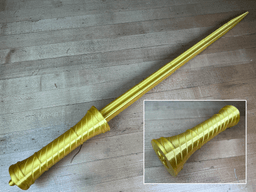

Collapsing Magic Sword Print-in-Place
1.4K downloads · 3 years ago · **Collapsing Magic Sword**
_Warped Square Blade Print-in-Place Version_
This is the first version o
This model is restricted by licensing terms.
View license.
Collapsing Magic Sword Warped Square Blade Print-in-Place Version
This is the first version of this sword with a warped square blade but there will be more types of blades available for this hilt soon. This version of the sword prints complete all as one part.
The replaceable blade version is available to my members.
For best results use a .4mm nozzle. You can print the blades all at once concentrically or one at a time in vase mode. Find detailed instructions on how to print collapsing swords on my website.
Printed on the Muldex rep-rap IDEX
Support and Licensing If you would like to help support more free models please consider joining my Thangs Membership. Get permission to sell physical copies of my models by joining The Collapsing Arsenal
Collapsing Magic Sword Print-in-Place
1.4K downloads · 3 years ago in and
This model is restricted by licensing terms.
View license.

The Elucidator - Sword art Online - Print in place sword

I AM BATMAN: Print-in-Place Articulating Figure

Flexi Scorpion STL – Articulated Print-in-Place Scorpion Toy | No Supports | Easy FDM 3D Print
Flexi Cat — Articulated Print-In-Place 3D Printable Cat Toy (No Supports Required)

Flexi Donkey – Articulated Print-in-Place Model

Flexi Easter Bunny – Articulated Print-in-Place Model

Print-in-Place Mini Dumpster Fire Model – "This Is Fine" Edition

Flexi Love Cat | Print-in-place | No Support

Tactical 12oz Can Cup (Poser Edition) – Print-in-Place Multicolor STL | Display Style Drink Holder

Christmas Tree Ornament – Print-in-Place Flexi Toy (No Supports)

ORIGAMI STILT | Table Lamp E14, E26, E27 print-in-place
CheeseCube – Print-In-Place Infinity Cube

Flexi Fox | Print-in-place | No Support

Flexi Crocodile | Print-in-place | No Support

Flexi Border Collie | Print-in-place | No Support

Flexi hanging Monkey | Print-in-place | No Support
.png&w=3840&q=75)
Squeak Articulated Dragon Print-in-Place Mesh Mayhem

SwarmBot: Magno – Print-in-Place Flexi Robot Drone

Cute Flexi Gecko | Print-in-place | No Support

Thanks for all these files, designs, and funny short vids. Test print had no issue, but this print fused at the very start with first layer height at .2mm. I was able to cut it free so it works and the kids love it, but now I see some warping/splitting of the layers within the first 2 or 3 mm of the print, then the rest prints flawlessly. Anything you suggest other than higher first layer to test elephant's feet?
I think we might be ok. Sliced the STL at 25mm to test a .15mm first layer height and no fusion or warping we originally saw, so hoping we can try the full print again. Otherwise everything else is default using Orca slicer, .4mm nozzel, .2mm layer height after first layer for Flashforge Adventurer 5M Pro.
My print with a Dremel 3d printer looks great once completed, but the blade seems to be stuck in place. I had to reduce the overall size to 70% to fit the limited workspace size on the machine. Any tips on getting the layers of the blade to release?
Its probably stuck at the layer seams. I have a trouble shooting guide and a test print that will help you tune your retraction setting.
Also, its a harder print when scaled down.
How did you get such a wonderful gold?!?!?!
Is Prusament gold. It does look really good in pictures but I think it has a lot of yellow in it.