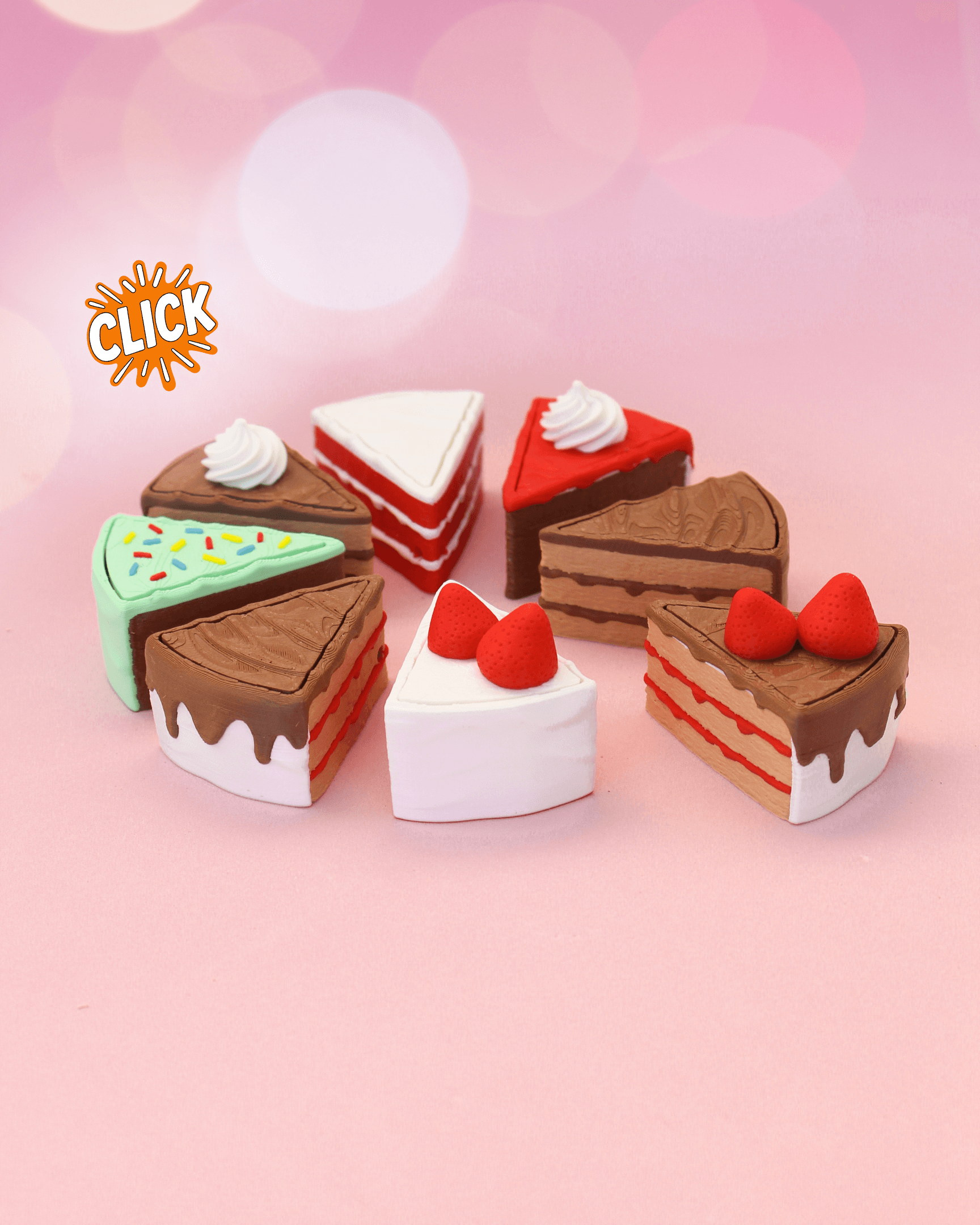


Cake Slice Fidget Clicker Keychain – Birthday Collection
399 downloads · 9 months ago · 🎂 This delicious collection of **Cake Slice Clickers** was made to celebrate the **first anniversar
🎂 This delicious collection of Cake Slice Clickers was made to celebrate the first anniversary of Clickify 3D. A fun, playful design that’s sure to make any 3D print collection a little sweeter!
Private Use ONLY! If you’re interested in a commercial license to sell 3D printed versions of these designs and many more, join me on Patreon or Thangs: 📂 Patreon – Clickify3D 📂 Thangs – Clickify3D
Features:
- Compact and portable: perfect as a keychain or desk accessory.
- Satisfying click mechanism, designed for mechanical keyboard switches (we recommend clicky switches like Kailh Box White V2).
- Keychain-friendly design, compatible with 2.4mm ball chains.
Printing Tips:
- No supports needed – Clean and hassle-free printing.
- All 3MF files are fully pre-configured for a smooth printing experience! – just slice and go!
🍰 Print your favorite slice, enjoy the clicks, and join the growing world of Clickify 3D creations! 🎉
Cake Slice Fidget Clicker Keychain – Birthday Collection
399 downloads · 9 months ago in and

Personalized Pencil Fidget Clicker | Custom Name Keychain

Care Bears Clicker Collection | Cute Bear Fidget Clickers Keychain

Summer Float Collection | Inflatable Pool Float Fidget Clickers & Desk Toys

Dim Sum Collection | Bao Bun, Jiaozi & Siu Mai Fidget Clickers and Keychains

Mount Rushmore Presidents Collection | Washington, Jefferson, Lincoln & Roosevelt Fidget Clickers

Horse Fidget Clicker Keychain, Farm Animal Desk Toy

Goat Fidget Clicker, Farm Animal Keychain

Sheep Fidget Clicker Keychain, Farm Animal Desk Toy

Goose Fidget Clicker Keychain, Farm Animal Desk Toy

Flareon & Jolteon - Pokeball Fidget Clickers

Cubone & Piplup - Pokeball Fidget Clickers

Candy Clicker Characters, Mascot Style Fidget Toy

World Cup Logo Fidget Clickers, Switch Toy Keychain

World Cup Trophy Fidget Clickers, Desk Toy

Cheese Board Fidget Clickers Keychain

Raccoon Fidget Clicker Keychain, Clicky Desk Toy

Squirrel Fidget Clicker Keychain, Click Toy

Panda Fidget Clicker Keychain, Cute Desk Toy

Beaver Fidget Clicker Keychain, Cute Animal Click Toy

Each time I print the top piece with sprinkles I get a strange artifact near one of the top sprinkles. It is always a faded version of the sprinkle color just above it. I don't think it is due to my purging settings, because it happens regardless of the color of the sprinkles. Any ideas about what might cause this smudging/artifact? I tried sanding it off but it goes a few layers deep. Here's a photo showing two examples: https://i.postimg.cc/fbRZ1nY6/sprinkles_Dots.jpg.
In multi color printing, the slicer decides how it expands certain areas to avoid printing too little material. That behavior can sometimes create these visual artifacts. I hope that makes sense 🙂
Hi 🙂 that is due to the way the slicer decides how to print the colors. In the preview tab of your slicer, you should be able to see exactly where it prints that artifact. Since the top layers are white and usually only one or two layers thick, that artifact becomes visible. I have already spent several hours trying to solve this, and I have not found a perfect fix yet.
I get the 'loading of a model file failure' error when I import any of the 'BASE' files into PruseSlicer. Does anyone know of a workaround to get the model to import?
Hi! I create all the 3MF files in Bambu Studio, which is why PrusaSlicer sometimes has trouble opening them.
The best workaround is to open the 3MF file in Bambu Studio first and then export it as an STL. After that, you’ll be able to import the STL into PrusaSlicer without any issues.
Just keep in mind that STL files only contain the geometry, they do not include any print settings, colors, or pre configured parameters, so you’ll need to set those up manually in PrusaSlicer.
Hope that helps
Cool, love the design. Excited about the giveaway!