


MEMORY BOOK | PHOTO ALBUM
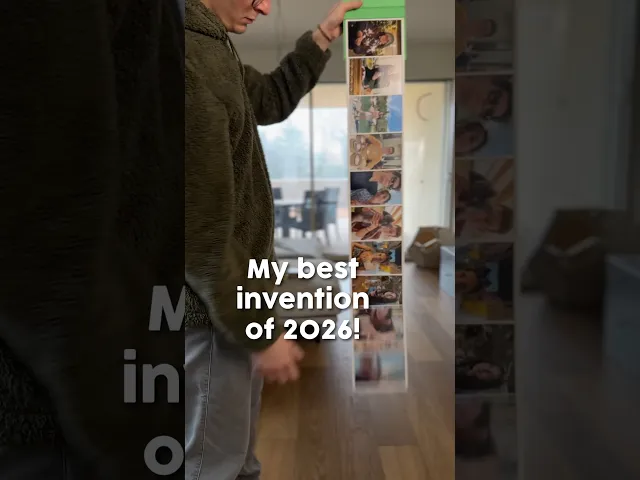
Capture your Year in Review with this unique 3D-printable photo album. It’s designed to hold 12 standard 15x10cm / 6x4" photos (exactly 152x102mm) that smoothly slide over one another; a tactile and satisfying way to flip through your memories.
The cover is fully customizable within your slicer. The download files includes 6 pre-designed versions: Years "2024", "2025", "2026", "My Cat", "My Dog" and a blank cover for your personalized text or logos.
I highly recommend using high-quality Matte PLA filaments to ensure smoother movement. I personally used eSun Matte PLA, which performed excellently. In my tests with generic PLA brands, the pages didn't slide well. Please keep this in mind when choosing your materials!
For a more premium feel and a secure closure, I’ve included slots for four 6mm x 2mm magnets. This ensures the album stays closed even when you're on the go!
Designed for easy printing, no complex assembly required and it's perfect for gifts or personal keepsakes. Assembling the cover might seem tricky at first. I recommend gently bending the sections to help the pins slide into place. While the plastic is flexible, please be careful not to over-bend it to avoid damage.
OTHER VIDEO & PHOTO If you want to see more videos or photos of this design follow me on my Instagram or TikTok!
COMMERCIAL LICENSE Purchasing or downloading this file does not give you the right to sell physical prints of this design. You can obtain a commercial license for all my designs by signing up to my Thangs.
MEMORY BOOK | PHOTO ALBUM

STRING-FLEX - CUSTOMIZABLE CHARACTERS KEYCHAIN - MINECRAFT + GIFT

STRING-FLEX - CUSTOMIZABLE CHARACTERS KEYCHAIN - EASTER VERSION

STRING-FLEX - CUSTOMIZABLE CHARACTERS KEYCHAIN - VALENTINE'S DAY VERSION

STRING-FLEX - CUSTOMIZABLE CHARACTERS KEYCHAIN - MONSTERS VERSION
.JPEG&w=3840&q=75)
STRING-FLEX - CUSTOMIZABLE CHARACTERS KEYCHAIN

Memorial Frame Display STL | In Loving Memory Photo Frame | Pet Memorial | Remembrance Decor | 4x6
NObody - Magnets: Medito

Book Lover Gnome STL | Build-a-Gnome Add-On | Daisy Hat & Book Stack Accessories

dragon claw book holder

Polaroid Holder Love Letter (mini)

Japanese Design Instax Mini Photo Frame | Self-Standing Table & Wall Display | Kumo

Camera Cake Pop Mold, Travel Memories Theme, 2-Piece STL Set for 3D Printing PRODUCT_2781
MiniPolaroidStands

HEART BOOKMARKS COLLECTION (THREE VERSIONS) + CUSTOMITION / FAST PRINTING GIFT / VALENTINES

Camera Cookie Cutters & Stamps, Travel-Themed Baking Tool Set, Cookie & Fondant Designs, 3 Sizes Available PRODUCT_1953
Sign of the Horns

Sleeping Baby Bunny in Angel Wings

Fantasy Star House Magical Spiral Bookend STL File 3D Printable
![Rune Fox [Forest Guardian] 3d model](/_next/image?url=https%3A%2F%2Fstorage.googleapis.com%2Fproduction-thangs-public%2Fuploads%2Fenhanced_images%2Fv1%2F354a299d-8420-4175-aa1f-85e732879b83%2F1.png&w=3840&q=75)
Rune Fox [Forest Guardian]

Are you able to easily adjust this so it could hold instax wide pictures please?
Can you make it to hold US standard 4x6 or 5x7 sizes? Also can you add the alphabet or number characters so we can mix and match and spell out things, instead of only 2024-2026 and cat and dog?
Hello! This is for the standard 15x10 format (6x4")
I have included a blank cover in the file so that you can write whatever you want on it. Just use the function in the slicer, it's very easy! I recommend watching a video on YouTube on how to insert text with the slicer!
Would love to have this smaller for 4x6 photos
Hello, I printed it and I have to say it’s incredible! Everything went perfectly: the parts fit together well and the photos slide perfectly. I used a matte filament from Sunlu. I’m now moving on to the Memories coasters! I’d like to congratulate you on your work keep it up, your ideas are amazing and the file quality is flawless. Thank you!
Hello!! Thank you so much🤩
I'm so glad to hear everything went so smoothly!
You'll have even more fun with Memory Coasters!
Thanks again and have fun! See you next time with the next invention!
Hello! I downloaded this file, very excited to try this. I started printing the 11 slide pages. After the first 2, I snapped them together, it was very tight (I am using an Ender 3), I had to go into my CAD drawing (tinkercad) and made the slides a little bit narrow, not much and then the stops on them a little bit shorter in height. It seemed as though the tolerance was too tight for my printer. Afterwards, I waxed the slides to reduce friction. Hope this helps others solve some problems.
I don't know if its allowed, but I have the same problem with friction. Would you be able to send me your edited file?
I emailed af_inventions and I haven't heard back from him. I don't know if it is allowed to send an altered file either. I do know that I have been having a great luck using the Sunlu green and yellow filaments. I know he had said to use a matte finish which I feel that these are. So, I don't know if that would help correct your issue. If I hear from him, I will let you know.
Hi! Could you please share the slicer settings you used for this model?, I’m having an issue where the photo pages don’t move smoothly and often get stuck, and I’d like to check if it might be related to the slicer configuration. Thanks in advance!
Good morning, I'm sorry to hear about this problem!
Have you downloaded the latest version (V3)? It contains several tips on how to print this design in the best possible way!
Let me know if you still have printing problems after following the advice in the file!
Thank you very much, ALFI
I just purchased the subscription and printed this album book. I love the idea. So many things it can be used for and so many different audience that can use this. My one this is the pages sometimes get stuck and don't slide. Any suggestions edits or tricks for this? I tried to soften the edges with a heat gun it worked somewhat but wanted to see if you had any suggestions. FYI im using the Crality K2 plus. I did use the file you had for Creality which was so helpful.
Good morning, I'm sorry to hear about this problem!
Have you downloaded the latest version (V3)? It contains several tips on how to print this design in the best possible way!
Let me know if you still have printing problems after following the advice in the file!
Thank you very much, ALFI
Do you have instructions on how to assemble? Which page do you start first? I'm just curious as they seem to have those notches? Thanks!
Assembly is very simple, no instructions are needed. There are two types of pages, normal pages and the front page. You need to print 11 normal pages and 1 front page. Put them all together and then attach them to the cover. If you need any help, feel free to write to me!
How does the very bottom sheet attach without falling off? I had to switch to a single normal page per plate, as no matter what I did, the right side plate clumped and destroyed the other page. If you have observed this, let me know. I would love to be able to minimize my filament loss. Bambu P1P following all the recommendations, matte pla.
Basically, I lost 9 Matte pages before I gave up and switched to silk PLA. Let's hope it actually allows printing multiple pages per plate this time! (Also, I found out that the bottom plate just snaps in, so that's all good now)
Thanks. My next question. How do you adjust it or what did you use to allow it to slide so smoothly?
I used Esun PLA matte. Nothing else. If you use normal PLA, it doesn't flow well.
That’s what I thought. I looked to see what I installed for PLA and I have Sunlu Matte. I do have the Esun arriving today.
Hopefully that fixes it. Thanks!